


With pipelines one can move unmanaged solutions from dev environment to Testing QA Environment as managed solution.
But, there lies an issue, once QA Team verifies solutions and the business functionality in QA Environment . QA Team will provide approval to move the same managed solutions from QA to User Acceptance Testing Environment (UAT) or to the higher environments.
As there is no option in Power Platform pipelines to deploy a managed solution from QA Environment to UAT Environment , then you have use Solution Artifacts present in Deployment Pipeline Configuration model driven app .
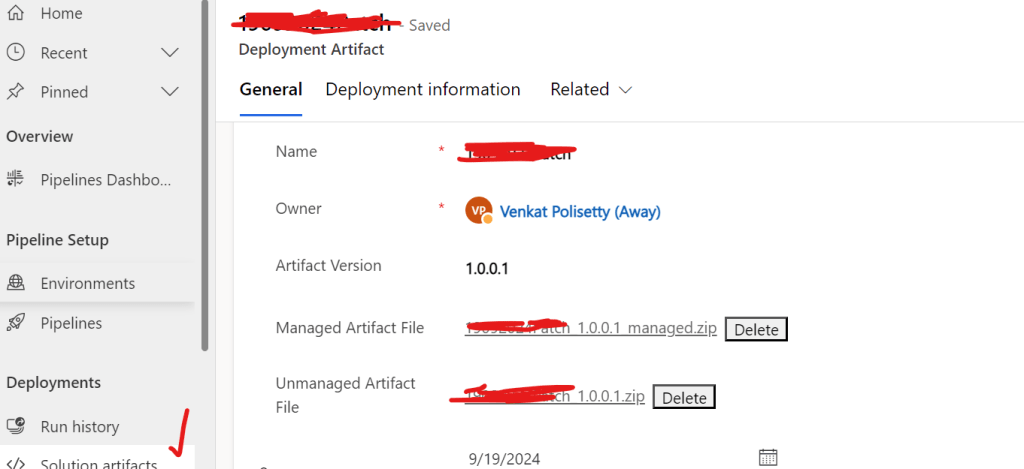
One can open the related section in Deployment Pipeline Configuration MDA App under Active Deployment Artifacts view and search for the respective managed solution version that was deployed in QA Environment.
Once you get search result component and open that and then you will see managed version of QA Deployed solution as Managed Artifact file solution_managed and Unamanged Artifact file unmamaged solution of QA environment solution.
Just take the above managed solution artifact , download it and then import to higher environments as shown in below picture.
Conclusion: Like this one can easily save lot of time , not taking backups of managed and unmanaged solutions before deployment.
Discover more from Common Man Tips for Power Platform, Dynamics CRM,Azure
Subscribe to get the latest posts sent to your email.
 Common Man Tips for Power Platform, Dynamics CRM,Azure