

Transforming Business Requirements into Scalable Enterprise Solutions
1. Executive Summary
Large enterprises often struggle with a common problem:
Business requirements are clear, but translating them into scalable, governed, and production-ready solutions takes time, coordination, and multiple handoffs.
Plan Designer in Microsoft Power Platform addresses this gap by enabling organizations to convert business intent directly into structured solution blueprints, backed by Dataverse, apps, automation, and AI — all within an enterprise-governed framework.
This use case demonstrates how Plan Designer can be adopted at enterprise scale to accelerate delivery while maintaining architecture consistency, security, and compliance.
2. Enterprise Business Context
Organization Profile
- Large enterprise with 10,000+ employees
- Multiple departments and business units
- Central IT + Power Platform Center of Excellence (CoE)
- Strong governance and compliance requirements
Key Challenges
- Slow application delivery cycles
- Repeated requirement clarification between business and IT
- Inconsistent data models across solutions
- High dependency on specialized developers
- Limited reusability of solution patterns
3. Enterprise Use Case Overview
Use Case Name
Enterprise Employee Lifecycle Management
Scope
Manage employee requests such as:
- Leave management
- Travel approvals
- Asset requests
- HR service requests
Stakeholders
- Employees
- Line Managers
- HR Operations
- IT / Power Platform CoE
- Security & Compliance teams
4. Role of Plan Designer in This Use Case
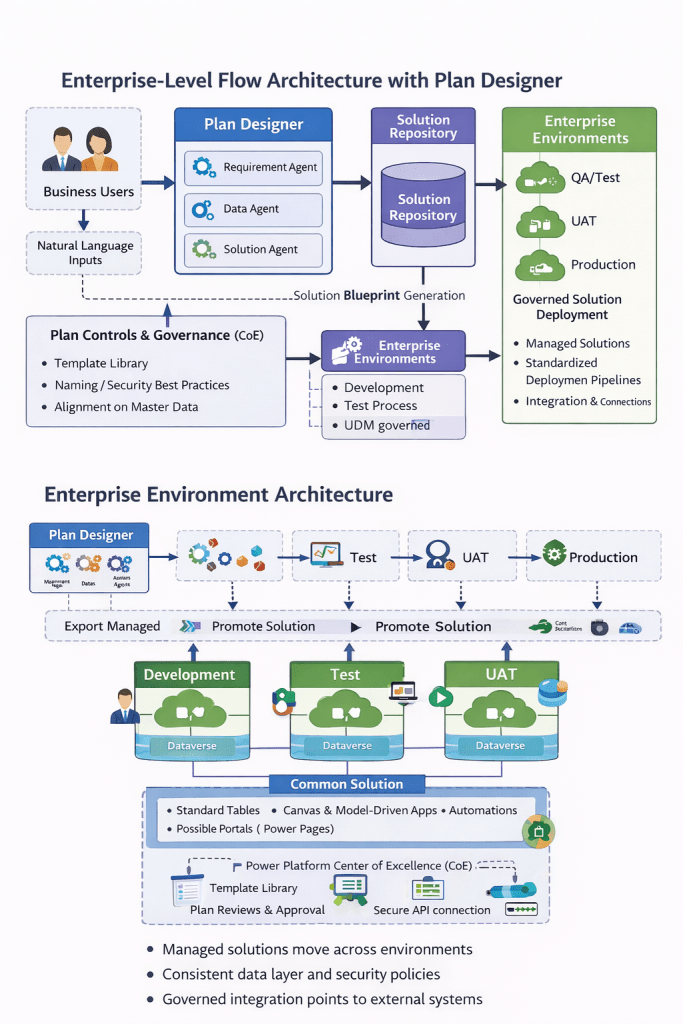
Plan Designer is used as the official entry point for solution creation across departments.
Instead of starting with:
- Manual requirement documents
- Whiteboard designs
- Separate data modeling sessions
The enterprise adopts a Plan-First Approach:
Every solution starts with a Plan.
5. Step-by-Step Enterprise Flow
Step 1: Business Requirement Definition
HR business users describe the requirement in natural language:
“Employees should submit leave requests.
Managers should approve or reject.
HR should have reporting and audit visibility.
Solution must comply with company policies.”
This input is provided directly inside Plan Designer.
Step 2: AI-Assisted Requirement Structuring
Plan Designer, using Copilot:
- Identifies enterprise roles (Employee, Manager, HR Admin)
- Extracts user needs
- Proposes enterprise-aligned solution components
This removes ambiguity and creates shared understanding between business and IT.
Step 3: Standardized Enterprise Data Modeling
Plan Designer generates:
- Dataverse tables
- Relationships
- Column types
Enterprise architects:
- Review naming standards
- Validate relationships
- Ensure alignment with master data strategy
Result: Consistent, reusable data models across departments
Step 4: Solution Blueprint Generation
Plan Designer proposes:
- Canvas Apps for employees
- Model-Driven Apps for managers and HR
- Power Automate flows for approvals
- Optional Power Pages for external access
- Copilot Studio agents for employee queries
All artifacts are generated inside a managed solution, aligned with enterprise ALM practices.
6. Governance & CoE Integration
Enterprise Controls Applied
- Solution created only in approved environments
- Naming conventions enforced
- Security roles reviewed before deployment
- Dataverse tables governed centrally
Plan Designer accelerates creation without bypassing governance.
7. Deployment & Lifecycle Management
Environment Strategy
- Dev → Test → UAT → Production
- Solution exported and promoted using standard pipelines
Change Management
- Plan versions tracked
- Enhancements applied through plan iteration
- Impact analysis easier due to centralized design
8. Business & IT Benefits
For Business Teams
- Faster solution turnaround
- Reduced dependency on IT
- Clear visibility of solution design early
For IT & CoE
- Standardized architecture
- Reduced technical debt
- Better governance enforcement
- Predictable solution quality
For Enterprise Leadership
- Lower development costs
- Faster time to value
- Scalable low-code adoption
9. KPIs & Success Metrics
- Requirement-to-solution time reduced by 50–70%
- Reusable components increased across departments
- Fewer post-production defects
- Higher business satisfaction scores
- Improved governance compliance
10. Enterprise Best Practices
- Mandate Plan Designer as the first step
- Maintain enterprise plan templates
- Review plans through CoE before generation
- Use Plan Designer for initial 80% of solution
- Final 20% handled by advanced customization
11. Strategic Impact
Plan Designer enables enterprises to move from:
- Project-based development
to - Capability-based solution delivery
It aligns business thinking, architecture, and execution into a single, repeatable process.
12. Conclusion
For enterprises adopting Power Platform at scale, Plan Designer is not just a feature — it is a foundational capability.
It ensures that:
- Business intent is preserved
- Architecture is consistent
- Governance is enforced
- Delivery is accelerated
This makes Plan Designer a critical enabler for enterprise-grade low-code transformation.
Discover more from Common Man Tips for Power Platform, Dynamics CRM,Azure
Subscribe to get the latest posts sent to your email.
 Common Man Tips for Power Platform, Dynamics CRM,Azure