

1. Business Problem Statement
In most enterprises today, business users depend heavily on IT teams for even the smallest process changes.
Typical challenges include:
- Manual, Excel-driven processes with no audit trail
- Long development cycles for simple business apps
- Disconnected systems causing data silos
- High dependency on custom code for automation and reporting
These challenges directly impact time-to-market, operational efficiency, and business agility.
This is where Microsoft Power Platform plays a crucial role.
2. What is Microsoft Power Platform?
Microsoft Power Platform is a low-code application platform that enables organizations to:
- Build business applications rapidly
- Automate workflows across systems
- Analyze data visually
- Create conversational AI experiences
All while maintaining enterprise-grade security, governance, and scalability.
3. Core Philosophy of Power Platform
The platform is designed around three key principles:
- Empower Citizen Developers
Business users can build solutions without deep programming knowledge. - Accelerate Professional Developers
Developers extend the platform using Azure, APIs, and custom connectors. - Governance Without Blocking Innovation
IT maintains control via environments, DLP policies, and ALM practices.
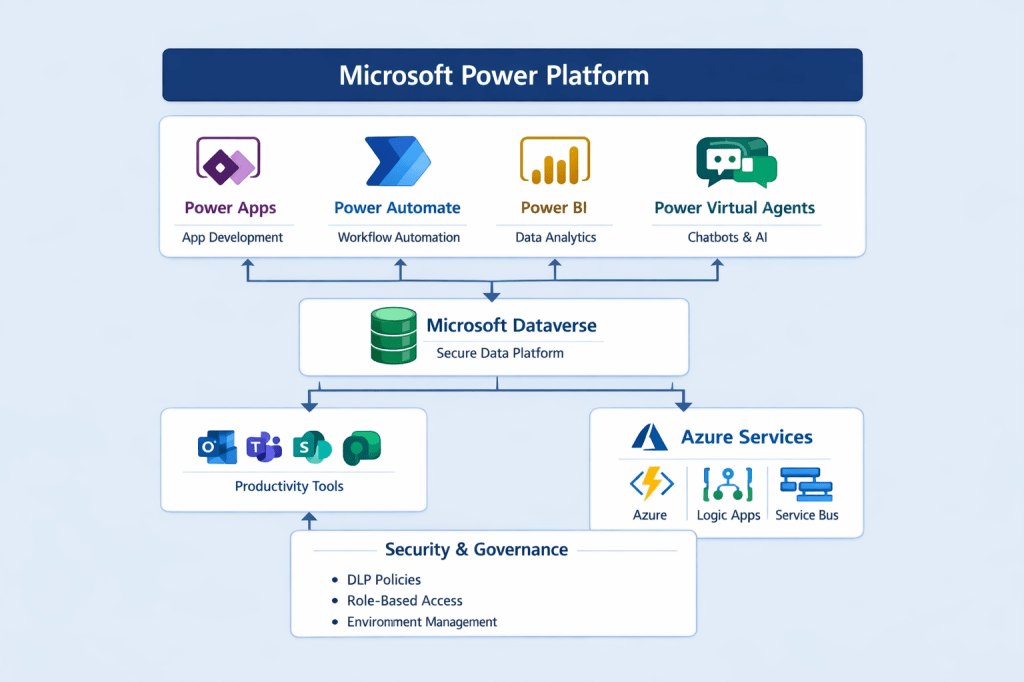
4. Power Platform High-Level Architecture
+————————————————–+
| Microsoft Power Platform |
| |
| +————+ +————-+ +————+|
| | Power Apps | | Power Autom.| | Power BI ||
| +————+ +————-+ +————+|
| \ | / |
| \ | / |
| +———————-+ |
| | Dataverse | |
| +———————-+ |
| | |
| +————–+————–+ |
| | | |
| Microsoft 365 Azure Services |
| (Teams, Outlook) (Functions, Logic Apps) |
+————————————————–+
Key Insight:
Dataverse acts as the secure data backbone, ensuring consistency, security, and scalability across solutions.
5. Core Components of Power Platform
5.1 Power Apps – Application Development
Power Apps enables rapid app creation using:
- Canvas Apps – Pixel-perfect UI, flexible design
- Model-Driven Apps – Data-driven, process-centric apps
Business Scenario:
A Sales team builds a Lead Tracking App in days instead of months.
5.2 Power Automate – Workflow Automation
Power Automate allows you to automate:
- Approvals
- Notifications
- Data synchronization
- Scheduled jobs
Example Workflow:
When a Lead is created
→ Send approval to Manager
→ If approved, notify Sales Team
→ Update Lead status
5.3 Power BI – Data Analytics
Power BI provides:
- Interactive dashboards
- Real-time reporting
- Role-based data access
Scenario:
Leadership tracks daily sales performance without relying on Excel exports.
5.4 Power Virtual Agents (Copilot Studio)
Enables creation of AI-powered chatbots for:
- HR support
- IT helpdesk
- Customer FAQs
Value:
Reduces support load and improves response times.
6. Dataverse – The Enterprise Data Layer
Dataverse is more than a database.
Key Capabilities
- Relational data modeling
- Business rules
- Security roles
- Auditing and compliance
- API access (Web API)
Simple Table Example
Table: Employee
————————-
EmployeeId (GUID)
Name (Text)
Email (Text)
Department (Choice)
IsActive (Yes/No)
7. Citizen Developer vs Pro Developer Model
+———————-+———————-+
| Citizen Developer | Pro Developer |
+———————-+———————-+
| Canvas Apps | Azure Functions |
| Basic Flows | Custom APIs |
| Excel-like formulas | Advanced integrations|
+———————-+———————-+
Best Practice:
Successful organizations blend both models, not choose one over the other.
8. Power Platform Licensing – High-Level View
- Per App / Per User licensing
- Pay-as-you-go for scalability
- Dataverse capacity considerations
👉 Licensing decisions should be aligned with business usage patterns, not just features.
9. Common Enterprise Use Cases
| Area | Use Case |
| HR | Leave request automation |
| Finance | Invoice approval workflows |
| Sales | Lead and opportunity tracking |
| IT | Service request portals |
| Operations | Field inspection apps |
10. Governance & Security Fundamentals
Enterprise adoption requires governance from day one.
Key Controls
- Environment strategy (Dev/Test/Prod)
- Data Loss Prevention (DLP) policies
- Role-based access control
- Solution-based ALM
Tenant
├─ Default Environment (Restricted)
├─ Dev Environment
├─ Test Environment
└─ Prod Environment
11. Why Power Platform is a Strategic Investment
Business Benefits
- Reduced development cost
- Faster delivery
- Improved business agility
- Reduced shadow IT
Technical Benefits
- Built-in security
- Seamless Microsoft ecosystem integration
- Extensible with Azure
12. Key Takeaways
- Power Platform bridges the gap between business and IT
- Dataverse is the foundation for enterprise-grade solutions
- Governance is an enabler, not a blocker
- Best results come from fusion teams
Discover more from Common Man Tips for Power Platform, Dynamics CRM,Azure
Subscribe to get the latest posts sent to your email.
 Common Man Tips for Power Platform, Dynamics CRM,Azure