


In Power Pages CRUD operations is a common scenario for any implementation with WebAPI. I will explain this step by step process with the example of creation and updating and deletion of dataverse records.
Step 1 : Go to Power Pages studio and add a new page and then provide the name as CRUD operations as shown below
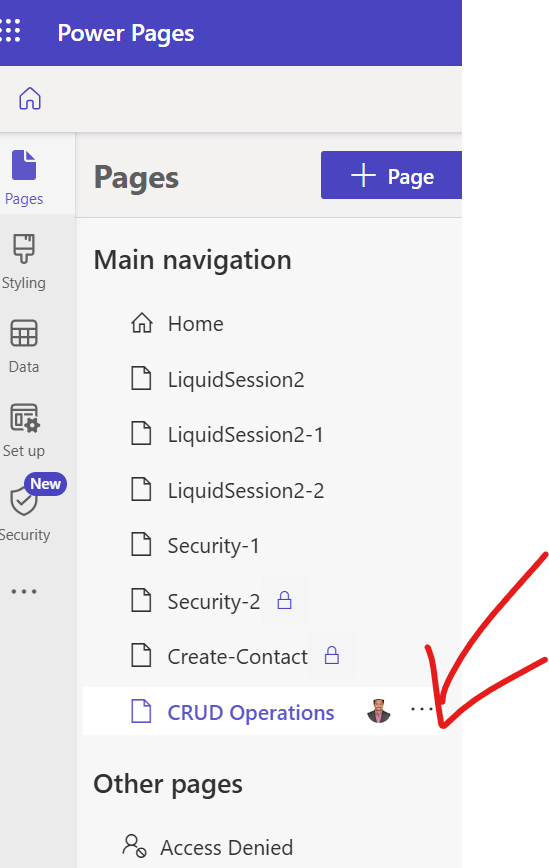
Step 2 : Go to Edit code and it opens a new online visual studio code editor after authentication and use the below code to perform all the CRUD Operations
<div class="row sectionBlockLayout text-start" style="min-height: auto; padding: 8px;">
    <div class="container" style="display: flex; flex-wrap: wrap;">
      <div class="col-lg-12 columnBlockLayout" style="padding: 16px; margin: 60px 0px; min-height: 200px;">
<!-- Sample code for Web API demonstration -->
<style>
    #processingMsg {
        width: 150px;
        text-align: center;
        padding: 6px 10px;
        z-index: 9999;
        top: 0;
        left: 40%;
        position: fixed;
        -webkit-border-radius: 0 0 2px 2px;
        border-radius: 0 0 2px 2px;
        -webkit-box-shadow: 0 2px 4px rgba(0, 0, 0, 0.2);
        box-shadow: 0 2px 4px rgba(0, 0, 0, 0.2);
        display: none;
    }

    table td[data-attribute] .glyphicon-pencil {
        margin-left: 5px;
        opacity: 0;
    }

    table td[data-attribute]:hover .glyphicon-pencil {
        opacity: 0.7;
    }
</style>

<script>

  $(function() {
    //Web API ajax wrapper
    (function(webapi, $) {
      function safeAjax(ajaxOptions) {
        var deferredAjax = $.Deferred();
        shell.getTokenDeferred().done(function(token) {
          // Add headers for ajax
          if (!ajaxOptions.headers) {
            $.extend(ajaxOptions, {
              headers: {
                "__RequestVerificationToken": token
              }
            });
          } else {
            ajaxOptions.headers["__RequestVerificationToken"] = token;
          }
          $.ajax(ajaxOptions)
            .done(function(data, textStatus, jqXHR) {
              validateLoginSession(data, textStatus, jqXHR, deferredAjax.resolve);
            }).fail(deferredAjax.reject); //ajax
        }).fail(function() {
          deferredAjax.rejectWith(this, arguments); // On token failure pass the token ajax and args
        });
        return deferredAjax.promise();
      }
      webapi.safeAjax = safeAjax;
    })(window.webapi = window.webapi || {}, jQuery)
    // Notification component
    var notificationMsg = (function() {
      var $processingMsgEl = $('#processingMsg'),
        _msg = 'Processing...',
        _stack = 0,
        _endTimeout;
      return {
        show: function(msg) {
          $processingMsgEl.text(msg || _msg);
          if (_stack === 0) {
            clearTimeout(_endTimeout);
            $processingMsgEl.show();
          }
          _stack++;
        },
        hide: function() {
          _stack--;
          if (_stack <= 0) {
            _stack = 0;
            clearTimeout(_endTimeout);
            _endTimeout = setTimeout(function() {
              $processingMsgEl.hide();
            }, 500);
          }
        }
      }
    })();
    // Inline editable table component
    var webAPIExampleTable = (function() {
      var trTpl = '<% _.forEach(data, function(data){ %>' +
        '<tr data-id="<%=data.id%>" data-name="<%=data.fullname%>">' +
        '<% _.forEach(columns, function(col){ %>' +
        '<td data-attribute="<%=col.name%>" data-label="<%=col.label%>" data-value="<%=data[col.name]%>">' +
        '<%-data[col.name]%><i class="glyphicon glyphicon-pencil"></i>' +
        '</td>' +
        '<% }) %>' +
        '<td>' +
        '<button class="btn btn-default delete" type="submit"><i class="glyphicon glyphicon-trash" aria-hidden="true">Delete</i></button>' +
        '</td>' +
        '</tr>' +
        '<% }) %>';
      var tableTpl = '<table class="table table-hover">' +
        '<thead>' +
        '<tr>' +
        '<% _.forEach(columns, function(col){ %>' +
        '<th><%=col.label%></th>' +
        '<% }) %>' +
        '<th>' +
        '<button class="btn btn-default add" type="submit">' +
        '<i class="glyphicon glyphicon-plus" aria-hidden="true"></i> Add Sample Record' +
        '</button>' +
        '</th>' +
        '</tr>' +
        '</thead>' +
        '<tbody>' + trTpl + '</tbody>' +
        '</table>';
      function getDataObject(rowEl) {
        var $rowEl = $(rowEl),
          attrObj = {
            id: $rowEl.attr('data-id'),
            name: $rowEl.attr('data-name')
          };
        $rowEl.find('td').each(function(i, el) {
          var $el = $(el),
            key = $el.attr('data-attribute');
          if (key) {
            attrObj[key] = $el.attr('data-value');
          }
        })
        return attrObj;
      }
      function bindRowEvents(tr, config) {
        var $row = $(tr),
          $deleteButton = $row.find('button.delete'),
          dataObj = getDataObject($row);
        $.each(config.columns, function(i, col) {
          var $el = $row.find('td[data-attribute="' + col.name + '"]');
          $el.on('click', $.proxy(col.handler, $el, col, dataObj));
        });
        //User can delete record using this button
        $deleteButton.on('click', $.proxy(config.deleteHandler, $row, dataObj));
      }
      function bindTableEvents($table, config) {
        $table.find('tbody tr').each(function(i, tr) {
          bindRowEvents(tr, config);
        });
        $table.find('thead button.add').on('click', $.proxy(config.addHandler, $table));
      }
      return function(config) {
        var me = this,
          columns = config.columns,
          addHandler = config.addHandler,
          deleteHandler = config.deleteHandler,
          $table;
        me.render = function(el) {
          $table = $(el).html(_.template(tableTpl)({
            columns: columns,
            data: me.data
          })).find('table');
          bindTableEvents($table, {
            columns: columns,
            addHandler: addHandler,
            deleteHandler: deleteHandler
          });
        }
        me.addRecord = function(record) {
          $table.find('tbody tr:first').before(_.template(trTpl)({
            columns: columns,
            data: [record]
          }));
          bindRowEvents($table.find('tbody tr:first'), config);
        }
        me.updateRecord = function(attributeName, newValue, record) {
          $table.find('tr[data-id="' + record.id + '"] td[data-attribute="' + attributeName + '"]').text(newValue);
        }
        me.removeRecord = function(record) {
          $table.find('tr[data-id="' + record.id + '"]').fadeTo("slow", 0.7, function() {
            $(this).remove();
          });
        }
      };
    })();
    //Applicaton ajax wrapper
    function appAjax(processingMsg, ajaxOptions) {
      notificationMsg.show(processingMsg);
      return webapi.safeAjax(ajaxOptions)
        .fail(function(response) {
          if (response.responseJSON) {
            alert("Error: " + response.responseJSON.error.message)
          } else {
            alert("Error: Web API is not available... ")
          }
        }).always(notificationMsg.hide);
    }
    function loadRecords() {
      return appAjax('Loading...', {
        type: "GET",
        url: "/_api/contacts?$select=fullname,firstname,lastname,emailaddress1,telephone1",
        contentType: "application/json"
      });
    }
    function addSampleRecord() {
      //Sample data to create a record - change as appropriate
      var recordObj = {
        firstname: "Willie",
        lastname: "Huff" + _.random(100, 999),
        emailaddress1: "Willie.Huff@contoso.com",
        telephone1: "555-123-4567"
      };
      appAjax('Adding...', {
        type: "POST",
        url: "/_api/contacts",
        contentType: "application/json",
        data: JSON.stringify(recordObj),
        success: function(res, status, xhr) {
          recordObj.id = xhr.getResponseHeader("entityid");
          recordObj.fullname = recordObj.firstname + " " + recordObj.lastname;
          table.addRecord(recordObj);
        }
      });
      return false;
    }
    function deleteRecord(recordObj) {
      var response = confirm("Are you sure, you want to delete \"" + recordObj.name + "\" ?");
      if (response == true) {
        appAjax('Deleting...', {
          type: "DELETE",
          url: "/_api/contacts(" + recordObj.id + ")",
          contentType: "application/json",
          success: function(res) {
            table.removeRecord(recordObj);
          }
        });
      }
      return false;
    }
    function updateRecordAttribute(col, recordObj) {
      var attributeName = col.name,
        value = recordObj[attributeName],
        newValue = prompt("Please enter \"" + col.label + "\"", value);
      if (newValue != null && newValue !== value) {
        appAjax('Updating...', {
          type: "PATCH",
          url: "/_api/contacts(" + recordObj.id + ")/" + attributeName,
          contentType: "application/json",
          data: JSON.stringify({
            "value": newValue
          }),
          success: function(res) {
            table.updateRecord(attributeName, newValue, recordObj);
          }
        });
      }
      return false;
    }
    var table = new webAPIExampleTable({
      columns: [{
        name: 'firstname',
        label: 'First Name',
        handler: updateRecordAttribute
      }, {
        name: 'lastname',
        label: 'Last Name',
        handler: updateRecordAttribute
      }, {
        name: 'emailaddress1',
        label: 'Email',
        handler: updateRecordAttribute
      }, {
        name: 'telephone1',
        label: 'Telephone',
        handler: updateRecordAttribute
      }],
      data: [],
      addHandler: addSampleRecord,
      deleteHandler: deleteRecord
    });
    loadRecords().done(function(data) {
      table.data = _.map(data.value, function(record){
        record.id = record.contactid;
        return record;
      });
      table.render($('#dataTable'));
    });
  });
</script>
<div id="processingMsg" class="alert alert-warning" role="alert"></div>
<div id="dataTable"></div>


      </div>
    </div>
  </div>
Step 3 : After step 2, just save and sync page and you should see below UI where user can easily perform CRUD Operations

In this way one can easily perform these CRUD operations
Note : For update if user click on any record column then a popup will open where user can give details and respective record gets updated

2. Reblogged from here
Discover more from Common Man Tips for Power Platform, Dynamics CRM,Azure
Subscribe to get the latest posts sent to your email.
 Common Man Tips for Power Platform, Dynamics CRM,Azure