

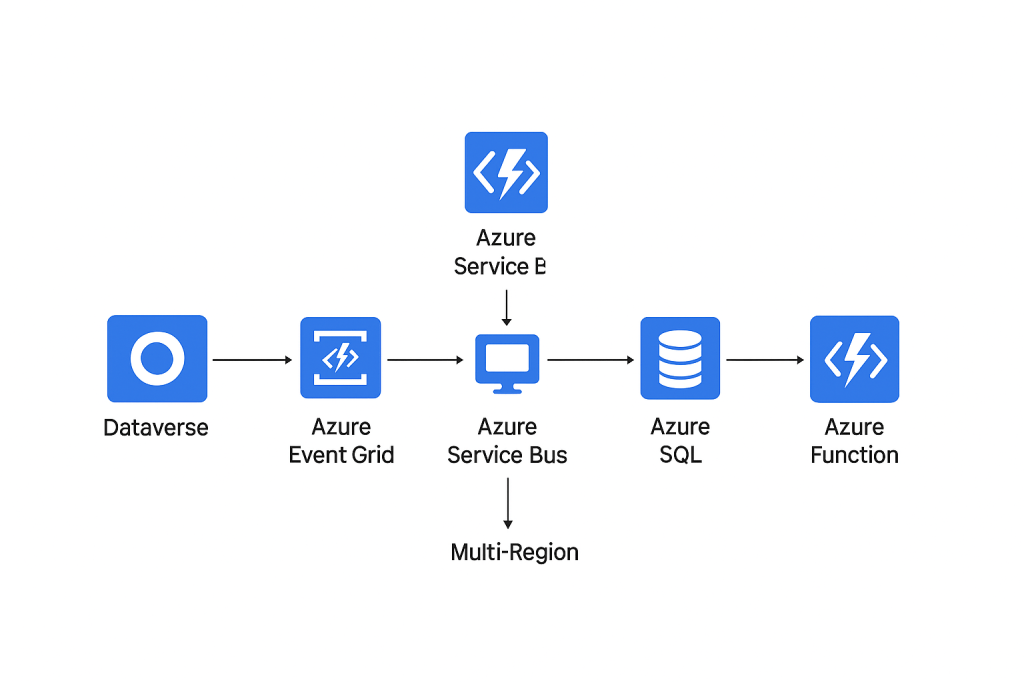
Detailed technical breakdown of designing a real-time bi-directional sync between Dataverse and Azure SQL for multi-region deployments:
1. Overview
Real-time bi-directional sync ensures that changes in Dataverse (Dynamics 365) reflect in Azure SQL and vice versa without delays, while supporting multiple regions (geo-distributed environments). This is critical for large enterprises with regional operations or multi-cloud architectures.
2. Challenges
- Latency – Ensuring minimal delay between regions.
- Conflict Resolution – Handling simultaneous updates in Dataverse and Azure SQL.
- Scalability – High volume of transactions across regions.
- Data Consistency – Maintaining ACID-like guarantees in a distributed system.
- Security & Compliance – Proper authentication, encryption, and regional compliance.
3. Architecture Approach
Components:
- Dataverse – Source/target CRM database.
- Azure SQL Database – Secondary target/source for analytics or operational systems.
- Azure Event Grid – Detects changes in Dataverse using Change Tracking or Dataverse Webhooks.
- Azure Functions / Logic Apps – Processes events and applies changes to the target database.
- Service Bus / Event Hubs – For buffering, queuing, and ensuring reliable delivery.
- Conflict Resolver – Function/service to handle update conflicts using timestamp/versioning.
- Azure API Management – Optional gateway for secure communication.
4. Step-by-Step Implementation
Step 1: Enable Change Tracking in Dataverse
- Activate change tracking on the required tables.
- Use the Dataverse API to retrieve changes periodically or via webhook notifications.
Step 2: Configure Event Delivery
- Use Azure Event Grid or Dataverse Webhooks to push changes to Azure.
- Subscribe Azure Functions or Logic Apps to these events.
Step 3: Queue Events for Reliability
- Use Azure Service Bus or Event Hubs to buffer incoming events.
- Ensures no data loss in case of transient failures or region latency.
Step 4: Map Dataverse Entities to Azure SQL Tables
- Create schema mappings.
- Handle data type conversions (e.g., lookup → foreign key).
Step 5: Implement Bi-Directional Flow
- Dataverse → Azure SQL:
- Trigger Function on event.
- Apply insert/update/delete operations.
- Azure SQL → Dataverse:
- Use CDC (Change Data Capture) or triggers in SQL.
- Push changes to Service Bus, then to Dataverse API.
Step 6: Conflict Resolution
- Use last-write-wins or custom merge logic based on business rules.
- Maintain version/timestamp columns for every row.
Step 7: Multi-Region Considerations
- Deploy Functions/Logic Apps in regional availability zones.
- Use geo-replication in Azure SQL for read/write splitting.
- Ensure Event Grid or Service Bus endpoints are region-aware.
Step 8: Monitoring & Alerts
- Use Application Insights to track failures, latencies, and message counts.
- Configure alerts for failed messages or processing bottlenecks.
5. Best Practices
- Always use managed identities for secure access between Dataverse and Azure.
- Implement idempotent operations to handle retries safely.
- Use batching for high-volume operations to reduce API calls.
- Implement audit logging for regulatory compliance.
6. Tech Stack Summary
| Layer | Technology / Service |
|---|---|
| Source/Target DB | Dataverse, Azure SQL |
| Event Detection | Dataverse Change Tracking, Event Grid |
| Processing & Transformation | Azure Functions / Logic Apps |
| Messaging / Queueing | Azure Service Bus / Event Hubs |
| Security | Azure AD, Managed Identity, Key Vault |
| Monitoring | Application Insights, Log Analytics |
This architecture ensures real-time updates, scalable bi-directional sync, and region-aware deployments, making it ideal for enterprise-level multi-region CRM + Azure SQL integrations.
Discover more from Common Man Tips for Power Platform, Dynamics CRM,Azure
Subscribe to get the latest posts sent to your email.
 Common Man Tips for Power Platform, Dynamics CRM,Azure