

Introduction
Modern organizations generate enormous amounts of operational and analytical data every day. Business users need applications to capture and manage this data, while executives need meaningful insights to make strategic decisions.
Traditionally, these two worlds have operated separately:
- Business applications managed operational processes
- Data warehouses stored analytical data
- Reporting tools generated insights
- Multiple integrations connected everything together
This often resulted in:
- Data silos
- Complex integrations
- Delayed reporting
- Higher maintenance costs
- Inconsistent business insights
Microsoft addresses this challenge through the powerful combination of Power Apps and Microsoft Fabric, enabling organizations to build business applications and analytics solutions on a unified platform.
In this article, we will explore how these technologies work together to create modern, data-driven enterprise applications.
Learning Objectives
By the end of this article, you will understand:
✅ What is Microsoft Fabric
✅ What is Power Apps
✅ Why integration between Power Apps and Fabric matters
✅ Business benefits of a unified application and analytics platform
✅ Real-world implementation scenarios
✅ Enterprise architecture overview
Understanding the Modern Business Challenge
Consider a typical sales organization.
Sales representatives:
- Capture customer information
- Manage opportunities
- Track sales activities
- Update deal status
Sales managers:
- Monitor team performance
- Analyze conversion rates
- Forecast revenue
Executives:
- Review KPIs
- Track business growth
- Make strategic decisions
In many organizations, this information is scattered across:
- Excel files
- CRM systems
- Databases
- Reporting tools
As a result:
Sales Data → Multiple Systems → Manual Consolidation → Delayed Insights
Decision-making becomes slower and less reliable.
Organizations need a solution that combines:
- Business applications
- Data management
- Analytics
- Automation
- Governance
This is where Power Apps and Microsoft Fabric work together.
What is Power Apps?
Power Apps is Microsoft’s low-code application development platform that enables organizations to rapidly build business applications without extensive coding.
Using Power Apps, users can create:
- Employee management systems
- Customer service applications
- Inventory tracking solutions
- Project management tools
- Inspection and field service applications
Power Apps empowers:
- Business analysts
- Citizen developers
- Functional consultants
- Professional developers
to build enterprise applications quickly.
Power Apps Capabilities
Canvas Apps
Provide complete control over user experience and design.
Example:
A sales representative creates a mobile app to capture customer visits.
Model-Driven Apps
Focus on business processes and data-driven applications.
Example:
A customer relationship management solution built on Dataverse.
Integration Capabilities
Power Apps integrates with:
- Microsoft 365
- Dataverse
- SharePoint
- SQL Server
- Azure Services
- Microsoft Fabric
This integration capability makes Power Apps a central component of Microsoft’s business application ecosystem.
What is Microsoft Fabric?
Microsoft Fabric is Microsoft’s unified analytics platform that brings together:
- Data Engineering
- Data Science
- Data Warehousing
- Real-Time Analytics
- Business Intelligence
into a single Software-as-a-Service (SaaS) solution.
Microsoft Fabric eliminates the need for multiple disconnected analytics platforms.
Key Components of Fabric
OneLake
OneLake acts as the central data lake for the organization.
Think of OneLake as:
OneDrive for enterprise data.
It provides a single location for storing and managing business data.
Lakehouse
Combines:
- Data lake flexibility
- Data warehouse performance
in a unified architecture.
Data Warehouse
Supports structured analytical workloads and enterprise reporting.
Data Factory
Provides data integration and orchestration capabilities.
Real-Time Intelligence
Processes and analyzes streaming business events.
Power BI
Provides interactive dashboards and enterprise reporting.
Why Does Integration Matter?
Organizations often face a common challenge:
Applications generate operational data, but analytics platforms require analytical data.
Without integration:
Application ↓Manual Export ↓ETL Process ↓Data Warehouse ↓Reporting
This creates:
- Additional complexity
- Data duplication
- Delayed reporting
- Increased operational costs
Power Apps and Microsoft Fabric eliminate many of these challenges.
Unified Business Application Platform
When Power Apps and Microsoft Fabric work together:
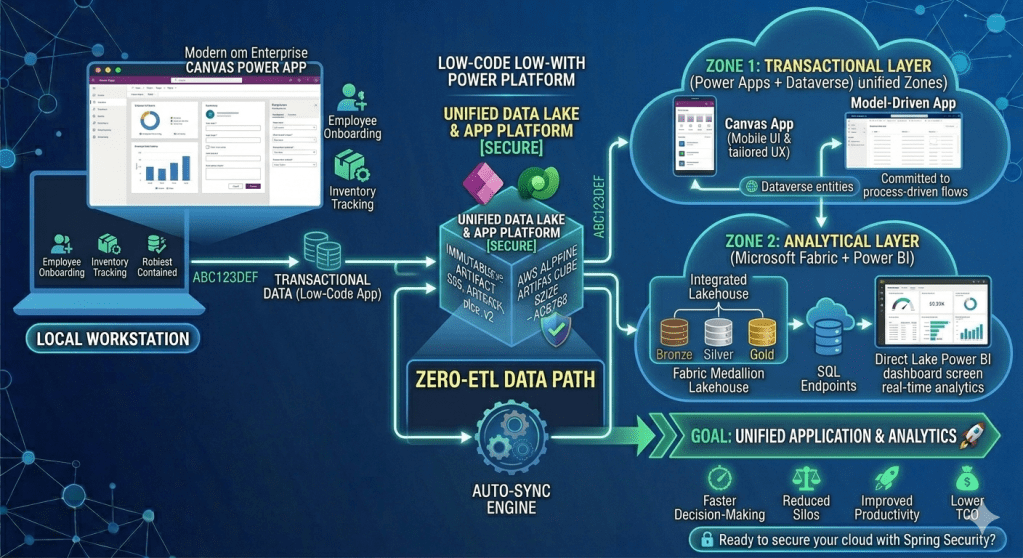
Power Apps ↓Dataverse ↓Microsoft Fabric ↓OneLake ↓Power BI Dashboards ↓Business Insights
Operational data becomes analytical data with minimal friction.
Real-World Business Scenario
Sales Performance Management
Imagine a multinational organization with hundreds of sales representatives.
Challenge
Sales representatives update opportunities through an application.
Management wants:
- Daily revenue forecasts
- Sales trends
- Territory performance
- Product-wise analysis
Traditional approach:
CRM ↓Export Data ↓ETL ↓Warehouse ↓Dashboard
This may take hours or even days.
Modern Power Apps + Fabric Solution
Step 1: Sales Application
Sales representatives use a Power App to:
- Create opportunities
- Update deal status
- Capture customer interactions
Step 2: Dataverse Storage
Business data is stored securely in Dataverse.
Step 3: Fabric Analytics
Microsoft Fabric ingests and processes operational data.
Step 4: Power BI Reporting
Executives consume near real-time dashboards.
Step 5: Better Decisions
Leadership gains:
- Revenue visibility
- Pipeline forecasting
- Sales productivity insights
without waiting for manual reporting cycles.
Business Value of Unified Applications and Analytics
Faster Decision-Making
Organizations gain access to timely information.
Benefits:
- Reduced reporting delays
- Improved responsiveness
- Better strategic planning
Reduced Data Silos
Applications and analytics share a connected ecosystem.
Benefits:
- Consistent business data
- Single source of truth
- Improved governance
Improved Productivity
Business users spend less time preparing data.
Benefits:
- More focus on business outcomes
- Faster reporting cycles
- Reduced manual effort
Lower Total Cost of Ownership
A unified platform reduces:
- Integration complexity
- Infrastructure costs
- Maintenance effort
Better Scalability
Organizations can scale:
- Applications
- Analytics
- Data workloads
without redesigning the entire architecture.
Enterprise Architecture Overview
High-Level Architecture
Users ↓Power Apps ↓Dataverse ↓Microsoft Fabric ↓OneLake ↓Power BI ↓Executives & Decision Makers
This architecture enables organizations to combine operational systems with analytical capabilities.
Who Benefits from This Integration?
Business Users
- Faster application development
- Better user experiences
Managers
- Improved operational visibility
- Better team performance insights
Executives
- Strategic dashboards
- Data-driven decision-making
IT Teams
- Simplified architecture
- Improved governance
- Reduced maintenance
PL-900, PL-100 and DP-600 Perspective
PL-900 (Power Platform Fundamentals)
Understand:
- Power Apps
- Dataverse
- Power Platform ecosystem
PL-100 (Power Platform App Maker)
Understand:
- Application development
- Data integration
- User experiences
DP-600 (Microsoft Fabric Analytics Engineer)
Understand:
- OneLake
- Lakehouse
- Data Warehousing
- Power BI Integration
Key Takeaways
✔ Power Apps enables rapid business application development.
✔ Microsoft Fabric provides a unified analytics platform.
✔ Integration creates a connected ecosystem for operational and analytical workloads.
✔ Organizations gain faster insights, reduced complexity, and improved decision-making.
✔ Power Apps and Microsoft Fabric together represent a modern approach to enterprise digital transformation.
What’s Next?
In the next article:
Understanding Microsoft Fabric Architecture for Power Apps Developers
We will explore:
- OneLake fundamentals
- Lakehouse architecture
- Data Warehouse concepts
- Real-Time Intelligence
- What every Power Apps developer should know about Microsoft Fabric
and build the foundation for integrating Power Apps with enterprise-scale analytics solutions. 🚀
Discover more from Common Man Tips for Power Platform, Dynamics CRM,Azure
Subscribe to get the latest posts sent to your email.

