

In earlier articles, we established how Power Apps and Microsoft Fabric converge to form modern, data-driven application ecosystems. We covered core operational concepts, explored the broader Fabric engine, and stepped through linking Dataverse tables directly to a Fabric Lakehouse.
Now, we move one layer deeper into the architecture. At the center of Microsoft Fabric lies OneLake—the single, unified SaaS data lake for the entire enterprise.
If Power Apps provides the operational interaction layer and Dataverse serves as the transactional engine, OneLake acts as the central data foundation. It enables organizations to capture operational data once and immediately make it available across analytical workloads—eliminating fragile ETL pipelines and redundant storage silos.
What is Microsoft OneLake?
Microsoft OneLake is a single, unified, logical data lake provisioned automatically for every Fabric tenant. Much like how Microsoft OneDrive consolidates personal file storage across an organization, OneLake provides a single, governed lake for all enterprise analytics.
The Problem: Pre-OneLake Fragmented Analytics
Historically, individual departments built isolated data lakes, leading to disparate security policies, duplicate data copies, complex synchronization pipelines, and sky-high storage costs.
 Traditional Data Lake Approach:
 [ Finance Apps ] ──> [ Finance Data Lake ]
 [ Sales Apps ]   ──> [ Sales Data Lake ]    ==> High Maintenance, Data Silos, &
 [ HR Apps ]      ──> [ HR Data Lake ]          Inconsistent KPIs
The Solution: OneLake Architecture
OneLake establishes a single, logical lake organized into Workspaces (for access boundary management) and Items (Lakehouses, Warehouses, Eventstreams).
 Unified Fabric Architecture:
                     ┌───────────────────┐
                     │ Microsoft OneLake │
                     └─────────┬─────────┘
        ┌──────────────────────┼──────────────────────┐
        ▼                      ▼                      ▼
 [ Sales Workspace ]   [ Finance Workspace ]   [ HR Workspace ]
 (Power Apps Sync)        (ERP System)          (HCM System)
        │                      │                      │
        └──────────────────────┼──────────────────────┘
                               ▼
                  [ Enterprise Semantic Model ]
                               │
                               ▼
                  [ Consolidated Executive View ]
Architectural Decision Framework: Dataverse vs. OneLake
A common area of confusion for Power Platform developers is determining when to use Dataverse versus OneLake. They are complementary engines optimized for entirely different workloads.
| Capability | Microsoft Dataverse | Microsoft Fabric OneLake |
| Primary Domain | Transactional & Operational App Data | Unified Enterprise Analytics & Big Data |
| Optimized Workload | High-frequency OLTP (Create, Read, Update, Delete) | High-speed OLAP (Analytical processing, Aggregations) |
| Power Apps Integration | Native, primary data source (Forms, Galleries, Views) | Read-Only Analytical Views (via SQL Endpoint/Shortcuts) |
| Storage Engine | Relational DB + Blob Storage + Azure Search | Open Delta Lake (Parquet) format |
| Security Model | Business Units, Role-Based Access (RBAC), Row/Column Level | Workspace RBAC, Item Permissions, OneLake Data Access |
| Scale | Transactional records and structured business logic | Petabyte-scale analytics and unstructured data lake storage |
Core Rule: Use Dataverse to run the transactional application (enforcing validation, security roles, and business logic). Use OneLake to analyze, transform, and report on enterprise-scale operational data.
Modern Data Virtualization with OneLake Shortcuts
A key feature of OneLake is Data Virtualization through Shortcuts.
Traditionally, combining data required moving it: extracting data from source systems, transforming it via heavy pipelines, and writing duplicate copies into a destination staging environment. Every duplicate copy introduces latency, governance risk, and storage overhead.
OneLake Shortcuts act as symbolic links (pointers) that reference data stored in external locations without copying the underlying files.
 External Sources                             Unified OneLake Storage
┌───────────────────┐                        ┌────────────────────────┐
│ Amazon S3 / ADLS  ├────── (Shortcut) ─────>│                        │
├───────────────────┤                        │  Fabric Lakehouse      │
│ Dataverse Tables  ├────── (Shortcut) ─────>│  (Virtual Consolidation)│
├───────────────────┤                        │                        │
│ Google Storage    ├────── (Shortcut) ─────>│                        │
└───────────────────┘                        └───────────┬────────────┘
                                                         │
                                                         ▼
                                             [ DirectLake Power BI ]
Shortcuts allow a Fabric Lakehouse to virtualize data across disparate cloud environments (Dataverse, Azure Data Lake Storage Gen2, Amazon S3, and Google Cloud Storage) into a single unified directory structure.
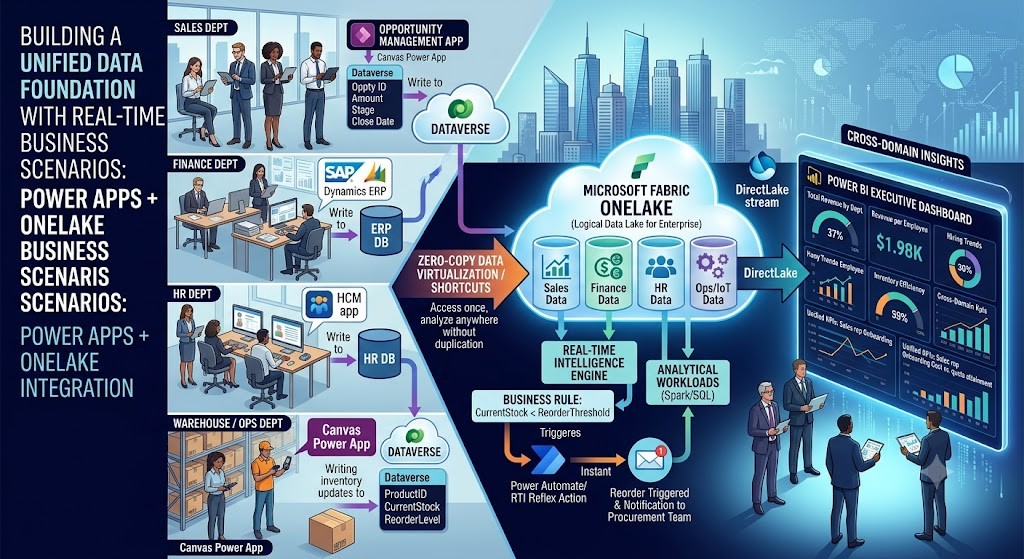
Real-World Business Scenario: Multi-Department Cross-Domain Analytics
To understand the business impact, consider a multi-department enterprise dashboard scenario:
The Problem
- Sales tracks deals in Power Apps and Dataverse.
- Finance manages ledger entries in an ERP (e.g., SAP or Dynamics 365 Finance).
- HR tracks workforce metrics in a third-party HCM application.
Historically, executives received three separate PDF or Excel reports with conflicting metrics, mismatched refresh times, and zero cross-domain visibility (such as calculating Revenue per Employee or Sales Rep Onboarding Cost vs. First Year Quota Attainment).
The Implementation Blueprint
1. Sales Domain (Power Apps + Dataverse)
Sales reps manage opportunities in a custom Power Apps Canvas application backed by Dataverse.
Table: SalesOpportunity-----------------------------------------------------------------------Column Name | Data Type | Description-----------------------------------------------------------------------OpportunityID | Autonumber | Primary KeyOpportunityName | Single Text | Account / Deal TitleAmount | Currency | Forecast ValueStage | Choice | Prospect, Proposal, Closed WonCloseDate | Date Only | Expected Target DateSalesRepEmail | Single Text | Entra ID User Principal Name
Through the native Dataverse Link to Fabric, this table is synchronized directly into OneLake as a Delta Parquet table with zero manual pipeline configuration.
2. Cross-Domain Data Virtualization
Using OneLake Shortcuts, the data engineering team creates a unified Fabric Lakehouse that references:
- Sales Dataverse Link (via native Fabric Shortcut).
- Finance ERP Invoices (via Azure Data Lake Storage Gen2 Shortcut).
- HR Roster & Payroll Data (via Fabric Dataflow Gen2 connection).
3. Building the Cross-Domain Analytical Model
Inside Fabric, a unified SQL View or Semantic Model joins these virtualized domains:
$$\text{Revenue Per Employee} = \frac{\sum(\text{SalesOpportunity}[\text{Amount}] \text{ WHERE Stage} = \text{‘Closed Won’})}{\text{COUNT}(\text{HREmployee}[\text{EmployeeID}])}$$
SQL
-- Cross-domain analytical view in Fabric SQL EndpointCREATE VIEW dbo.vw_DepartmentEfficiency ASSELECT s.DepartmentID, SUM(s.Amount) AS TotalRevenue, COUNT(DISTINCT h.EmployeeID) AS TotalHeadcount, SUM(s.Amount) / NULLIF(COUNT(DISTINCT h.EmployeeID), 0) AS RevenuePerEmployeeFROM [SalesWorkspace].[dbo].[SalesOpportunity] sINNER JOIN [HRWorkspace].[dbo].[HREmployee] h ON s.DepartmentID = h.DepartmentIDWHERE s.Stage = 'Closed Won'GROUP BY s.DepartmentID;
Real-Time Operational Intelligence Lifecycle
OneLake isn’t limited to static, historical reporting. By integrating Power Apps with Fabric’s Real-Time Intelligence (RTI) engine, you can build closed-loop, event-driven applications.
 [ Operational Event ]
   Warehouse staff updates stock to critical level via Power Apps Canvas
            │
            ▼
 [ Transactional Write ]
   Record commits to Dataverse
            │
            ▼
 [ Stream Ingestion ]
   Fabric Real-Time Eventstream captures Delta change log in sub-seconds
            │
            ▼
 [ Rule Evaluation ]
   Fabric Event House evaluates condition: (CurrentStock < ReorderThreshold)
            │
            ▼
 [ Automated Action ]
   Triggers Power Automate / Reflex Item to notify Procurement & auto-draft PO
Enterprise Governance, Security, and Best Practices
When building enterprise applications on Power Apps and OneLake, establish a robust governance and security framework:
1. Multi-Layer Security Architecture
- Operational Level (Dataverse): Use Dataverse security roles and Column-Level Security (CLS) to limit access within the transactional Power App interface.
- Analytical Level (OneLake/Fabric): Implement Fabric Workspace roles (Admin, Member, Contributor, Viewer) to govern lakehouse workspace access.
- Semantic Level (Power BI): Apply Row-Level Security (RLS) using
USERPRINCIPALNAME()to ensure executives only see analytics corresponding to their operational permissions.
2. Environment Management (ALM)
Establish a matching Lifecycle Management (ALM) strategy across both platforms:
Power Platform Development ──> Power Platform Test ──> Power Platform Production │ │ │ ▼ ▼ ▼Fabric Workspace [DEV] ──> Fabric Workspace [TEST] ──> Fabric Workspace [PROD]
3. Key Design Rules
- Avoid Storage Duplication: Use OneLake Shortcuts wherever possible instead of extracting and rewriting data across intermediate stages.
- Keep Operational Apps Lean: Do not execute massive aggregate queries over thousands of historical rows inside Power Apps using client-side canvas formulas. Query pre-aggregated Fabric SQL endpoints or embedded DirectLake Power BI tiles instead.
- Enforce Workspace Naming Conventions: Adopt structured prefixes across workspace items to simplify administration (e.g.,
APP-Sales-Dev,FAB-Sales-Analytics-Prod).
Exam & Certification Alignment
- PL-900 (Power Platform Fundamentals): Focuses on recognizing the role of Dataverse in storing business data and explaining how Power Platform integrates with Microsoft 365 and Fabric analytics.
- PL-100 (Power Platform App Maker): Emphasizes designing data models in Dataverse, connecting apps to corporate data sources, and embedding Power BI visualizations directly into user interfaces.
- DP-600 (Microsoft Fabric Analytics Engineer): Covers architecting OneLake structures, configuring shortcuts, managing Delta Lake tables, and building semantic models optimized for DirectLake mode.
Summary & Core Takeaways
- OneLake is the Unified Foundation: It operates as the single SaaS data lake for your organization, eliminating independent data silos across business domains.
- Complementary Roles: Dataverse handles transactional execution ($OLTP$); OneLake handles unified enterprise analytics ($OLAP$).
- Zero-Copy Virtualization: OneLake Shortcuts enable teams to analyze data across Dataverse, AWS, and Azure without managing expensive ETL data copies.
- Closed-Loop Intelligence: Integrating Power Apps with Fabric Real-Time Intelligence turns transactional user inputs into automated, event-driven business actions.
What’s Next?
In Article 5: Using Power Apps with Fabric Data Warehouse for Enterprise Applications, we will explore:
- The key architectural differences between a Fabric Lakehouse and a Fabric Data Warehouse.
- When to use Data Warehouse T-SQL workloads over Lakehouse Delta tables.
- Building an end-to-end Financial Reporting app connected to an enterprise Fabric Warehouse.
Discover more from Common Man Tips for Power Platform, Dynamics CRM,Azure
Subscribe to get the latest posts sent to your email.

