

Introduction:
In Dynamics 365 CRM, we can create a web resource through CRM Classic UI other than Unified User Interface. As an example, let us see the process of creation of web resource in Contact Customizations solution.
Step 1:
Login to the required environment and select required solution [Contact Customizations Solution in this case] as shown in the below figure.

Step 2:
After Step 1, Click on Settings Gear icon at the top of the screen and click on Advance Settings , post that a new window gets opened with classic UI of the selected crm environment as shown in the below figure.

Step 3:
After Step 2, Click on Settings -> Select Solutions under Customization area as shown in the below figure.

Step 4:
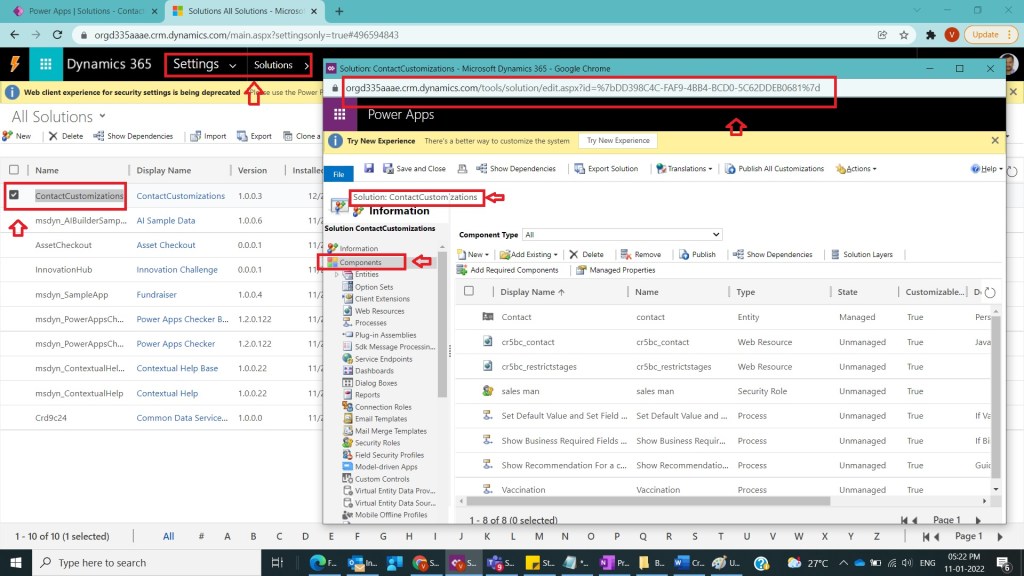
After Step 3, under solutions select Contact Customizations Solution and double click solution a new popup window with respective solution components will be shown like the below figure.
Step 5:
After Step 4, click on new -> Webresource as shown in the below figure.

Step 6:
After Step 5, a new web resource window will popups and provide the name ,Display Name, Type and Language with the below values
Name : contactform
Display Name: Contact Classic Form
Type : Script(Jscript)
Language: English
And click on Save and Publish as shown in the below figure.

Step 7:
After Step 6, you cannot save because webresource content should not be empty, so take a javascript file and upload it by using upload button and click on Save and Publish as shown in the below figure.

Step 8:
After Step 7, observe newly created webresource will be present in contact customizations solution as shown in the below figure.

Note:
- Make sure to publish all customizations and upload JavaScript (js) file.
- Took example of web resource of type js , other web resources like html,xml etc., can also be considered.
Conclusion: In this way, one can easily create a web resource through CRM Classic UI interface as well.
Discover more from Common Man Tips for Power Platform, Dynamics CRM,Azure
Subscribe to get the latest posts sent to your email.
 Common Man Tips for Power Platform, Dynamics CRM,Azure
Pingback: Back To Basics :Curated List of Articles in a Single Page – Common Man Tips for Power Platform, Dynamics CRM,Azure
Pingback: Rewind January 2022 – Common Man Tips for Power Platform, Dynamics CRM,Azure