

Introduction:
Number Formatting during few scenarios is required based on the customer requirement . In Power Automate, this can be achieved with Format Number Action. As an example, numeric value ,currency , Mobile numbers were shown using Format Number Action.
Step 1:
Login to the required Power Apps environment using URL make.powerapps.com by providing username and password and click on Flows on the left-hand side as shown in the below figure.

Step 2:
After Step 1, Click on New Flow and select instant cloud flow and provide the trigger as Manually trigger a flow and click on Create as shown in the below figure.

Step 3:
After Step 2 name the flow as Format Number and take an Format Number Action as shown in the below figure.

Step 4:
After Step 3, take an Format Number Action and name the step as Format Number and provide the inputs as
Number :8999
Format: 1,234.00
Locale : English (India) (en-IN)
as shown in the below figure.

Step 5:
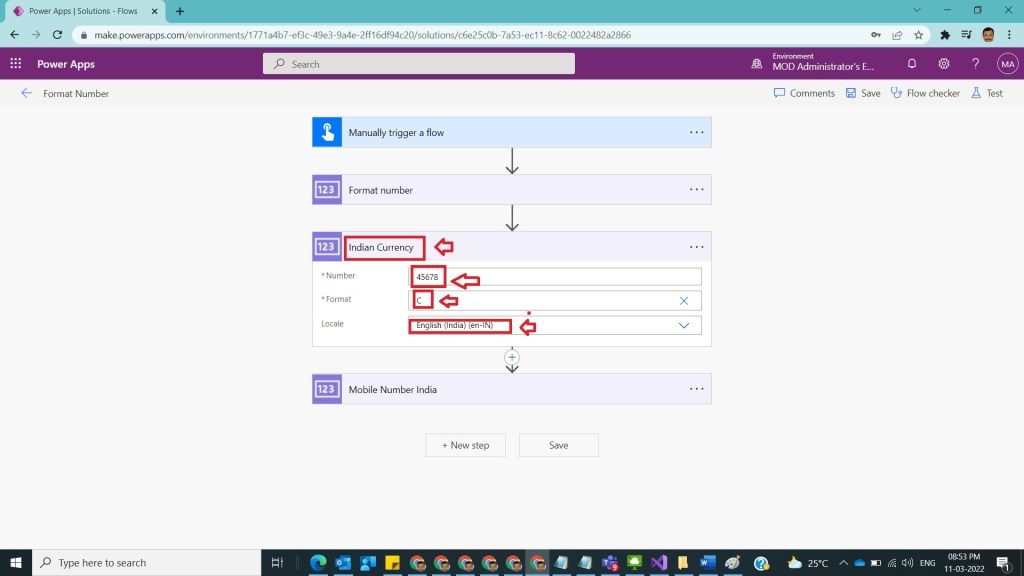
After Step 4, take another Format number action and name it as Indian Currency to show number as Indian currency and provide the inputs as
Number : 45678
Format: C
Locale : English (India) (en-IN)
As shown in the below figure.
Step 6:
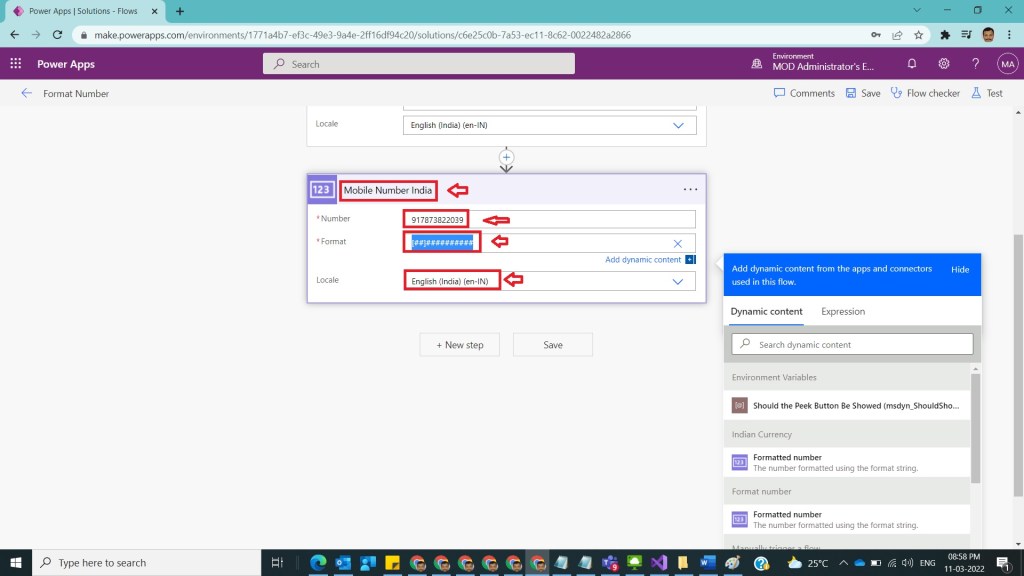
After Step 5, to show number in Indian mobile number format take another Format number action and name it as Mobile Number India and provide the values as inputs
Number : 917873822039
Format: [##]##########
Locale : English (India) (en-IN)
as shown in the below figure.
Step 7:
After Step 6, save and test the flow and observe the results as shown in the below figure.

Also

Note:
- Make sure to save the flow whenever you try expressions.
- Formats can be selected on the available list or custom formats can also be given.
- Microsoft documentation found here.
Conclusion: In this way we can use format number action in power automate to show numbers in different required formats based on customer requirements.
Discover more from Common Man Tips for Power Platform, Dynamics CRM,Azure
Subscribe to get the latest posts sent to your email.
 Common Man Tips for Power Platform, Dynamics CRM,Azure
Pingback: Rewind March 2022 – Common Man Tips for Power Platform, Dynamics CRM,Azure