

Introduction:
At times we used to prepare quick test data for customers to quickly demo. During that scenario we can easily create some test records with Power Automate. As an example I have showed how quickly create contact reo
Step 1:
Login to the required Power Apps environment using URL make.powerapps.com by providing username and password and click on Flows on the left-hand side as shown in the below figure.

Step 2:
After Step 1, Click on New Flow and select instant cloud flow and provide the trigger as Manually trigger a flow and click on Create as shown in the below figure.

Step 3:
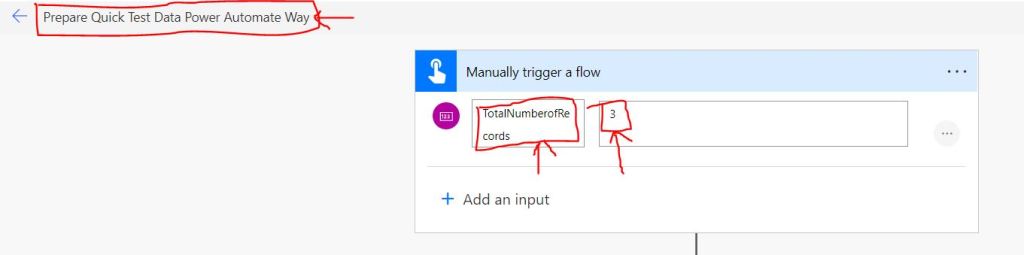
After Step 2 , name the flow as Prepare Quick Test Data Power Automate Way and under Manually trigger a flow trigger choose the type of user input as integer and provide the following values as
Name : TotalNumberofRecords
Value : 3
as shown in the below figure.
Step 4:
After Step 3 , take an initialize variable and provide the following values
Name : TotalRecords
Type : Integer
Value : @{triggerBody()[‘number’]} [Select the input variable that was given in Step 3 ]
as shown in the below figure.

Step 5:
After Step 4 , take Do until action and provide the following values
Variable : variables(‘TotalRecords’)
Condition : is less than
Value : 1
as shown in the below figure.

Step 6:
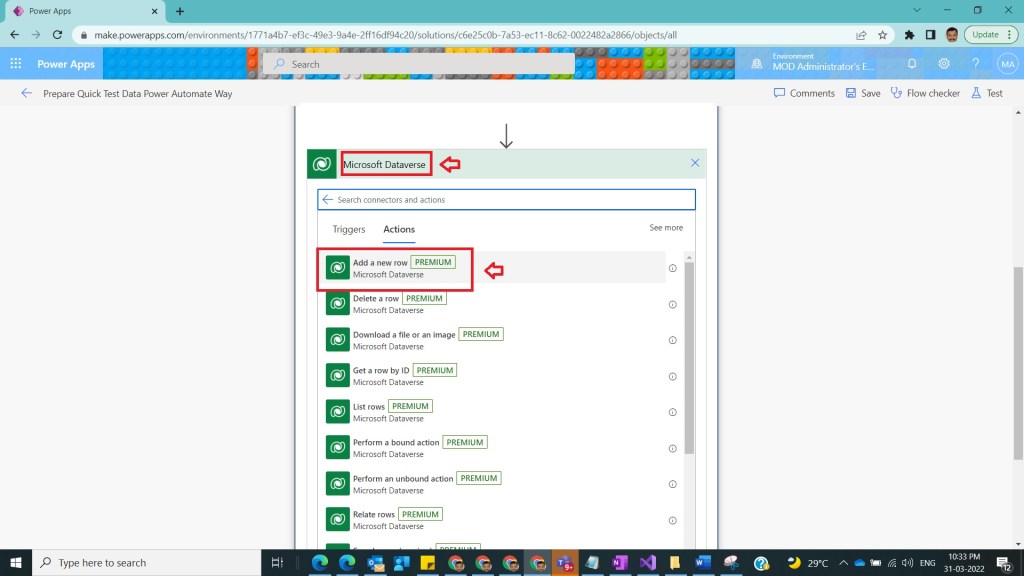
After Step 5 , inside Do until, after condition select an action in Dataverse and select add a new row as shown in the below figure.
Step 7:
After Step 6 , on add a new row select the following values as
Table name : Contacts
Last name : concat(‘TestRecord’,variables(‘TotalRecords’))
shown in the below figure.

Step 8:
After Step 7 , click on add an action and select Decrement variable and provide the following values as
Name : TotalRecords
Value : 1
shown in the below figure.

Step 9:
After Step 8 , save the flow and test it and observe the result that 3 new contacts gets created as shown in the below figure.

Note:
- Make sure to handle cautiously Do until action , other wise it will lead into infinite loops.
Conclusion: In this way we easily create test data without writing code using power automate.
Discover more from Common Man Tips for Power Platform, Dynamics CRM,Azure
Subscribe to get the latest posts sent to your email.
 Common Man Tips for Power Platform, Dynamics CRM,Azure
Pingback: Rewind March 2022 – Common Man Tips for Power Platform, Dynamics CRM,Azure