

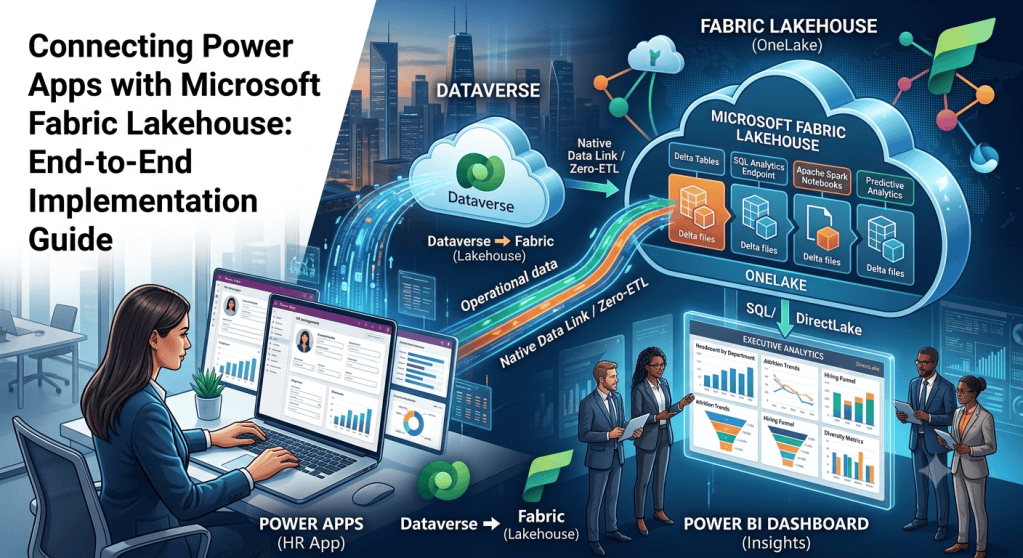
Modern enterprise applications must do more than capture transactional records; they must fuel continuous business intelligence. When operational front-ends are isolated from analytical back-ends, organizations suffer from delayed insights, fragile ETL pipelines, and fragmented decision-making.
By integrating Power Apps, Microsoft Dataverse, and Microsoft Fabric Lakehouse, you can bridge the gap between transactional execution and enterprise analytics. This guide walks through the architectural patterns, step-by-step implementation, and best practices for building a seamless, data-driven employee management solution.
Learning Objectives
By the end of this guide, you will master:
- The core architecture of a Fabric Lakehouse and how it supports operational apps.
- How to establish a zero-ETL data flow from Dataverse to Fabric OneLake.
- Designing a scalable architecture for bidirectional data interaction.
- Implementation steps for an automated, end-to-end Employee Management system.
- Enterprise security, governance, and performance optimization patterns.
The Business Challenge vs. The Modern Architecture
The Scenario:
An organization with 5,000+ globally distributed employees requires a system to manage high-frequency operational events: onboarding, department transfers, performance reviews, and exits.
While HR coordinators require a responsive transactional app to input this data, executives need real-time reporting on key metrics like attrition trends, headcount distributions, and performance scoring.
Traditional Approach vs. Modern Fabric Integration
- Traditional (Fragile): Scheduled overnight exports, custom Azure Data Factory pipelines, staging databases, and complex refresh schedules that result in lagged reporting.
- Modern (Seamless): Real-time transactional updates in Dataverse immediately visible in Microsoft Fabric via native virtualization—allowing direct DirectLake reporting in Power BI with zero manual ETL.
 [ Power Apps Canvas / Model-Driven ]  <-- (User inputs transactional HR events)
                 │
                 ▼
       [ Microsoft Dataverse ]         <-- (Secures, validates, & stores relational data)
                 │
                 ├── (Native Link / Shortcut)
                 ▼
       [ Microsoft Fabric OneLake ]    <-- (SaaS multi-engine open data lakehouse)
                 │
                 ├── [ Lakehouse Delta Tables ]
                 ├── [ SQL Analytics Endpoint ]
                 └── [ Spark Notebooks ] (For Predictive Attrition / AI)
                 │
                 ▼
         [ Power BI Reports ]          <-- (DirectLake Mode: Near-instantaneous executive views)
What is a Microsoft Fabric Lakehouse?
A Lakehouse is a unified data platform that merges the cost-effective, scalable storage of a Data Lake with the transactional capabilities, schema enforcement, and ACID compliance of a Data Warehouse.
In Fabric, a Lakehouse stores data in the highly optimized, open-source Delta Lake (Parquet) format. This architecture enables:
- Data Engineers to run Spark jobs and Python notebooks.
- Data Analysts to run high-speed SQL queries via the SQL Analytics Endpoint.
- Business Intelligence Professionals to build instant Power BI reports without copying or moving data.
Step-by-Step Implementation: Building the HR Analytics Solution
Step 1: Provision the Microsoft Fabric Workspace
- Sign in to the Microsoft Fabric portal.
- Select the Workspaces tab from the left navigation pane and click New Workspace.
- Name the workspace (e.g.,
HR-Analytics-Workspace) and select a dedicated Fabric capacity (F-SKU or Premium capacity). - Save to initialize the unified collaboration environment.
Step 2: Spin Up the Fabric Lakehouse
- Inside your newly created
HR-Analytics-Workspace, click + New and select Lakehouse. - Name the Lakehouse
EmployeeLakehouseand select Create. - Fabric automatically creates three primary endpoints:
- Lakehouse: The primary storage explorer for files and tables.
- SQL Analytics Endpoint: A read-only SQL connection string for running relational queries.
- Default Semantic Model: The direct semantic relationship layer for instant Power BI authoring.
Step 3: Define the Dataverse Transactional Schema
In the Power Apps Maker Portal, navigate to your environment and create three custom tables within Dataverse to act as your operational database:
Table 1: Employee
- Employee ID (Autonumber, Primary Key)
- Full Name (Text)
- Email (Email)
- Department (Lookup to Department Table)
- Designation (Text)
- Joining Date (Date)
- Status (Choice: Active, On Leave, Terminated)
Table 2: Department
- Department Name (Text, Primary Key)
- Manager (Lookup to Employee Table)
- Location (Text)
Table 3: Performance Review
- Review ID (Unique Identifier)
- Employee (Lookup to Employee Table)
- Review Date (Date)
- Rating (Choice: 1 – Unsatisfactory to 5 – Outstanding)
- Comments (Multiline Text)
Step 4: Link Dataverse directly to Microsoft Fabric
Instead of building manual data pipelines, leverage the native Dataverse Link to Microsoft Fabric capability. This feature automates the synchronization of Dataverse tables into Delta tables in Fabric OneLake.
- Navigate to the Power Apps Maker Portal.
- In the left navigation, select Azure Synapse Link (or navigate to Dataverse -> Link to Fabric).
- Click New link and select Microsoft Fabric.
- Select your Fabric Workspace (
HR-Analytics-Workspace) and click Save. - Under the table selection screen, select
Employee,Department, andPerformance Review. - Click Save.
Dataverse will now continuously package and export data into Delta Parquet format in your Azure-managed lakehouse and automatically map them as virtualized shortcuts inside your Fabric Lakehouse.
Data Ingestion Pattern Decision Matrix
For scenarios where the native Link to Fabric is not suitable, evaluate alternative patterns:
| Pattern | Ingestion Mechanism | Best Use Case | Update Latency |
| Dataverse Link | Native SaaS Virtualization | Operational transactional systems where maintenance-free synchronization is required. | Near-Real-Time (Minutes) |
| Fabric Dataflow Gen2 | Power Query Online | Scenarios requiring deep transformations, structural cleansing, or multi-source merging before loading. | Scheduled (Batch) |
| Spark Notebooks | PySpark/Scala pipelines | Complex programmatic joins, feature engineering, and training Machine Learning models. | On-Demand / Scheduled |
| Real-Time Eventstreams | Kafka/AMQP Endpoints | High-throughput sensor data, security logs, or instant IoT event streams. | Sub-Second |
Designing the Power Apps and Fabric Integration Patterns
To create a closed-loop system, design your communication patterns based on the specific direction of data:
┌────────────────────────────────────────────────────────┐│ POWER APPS ││ ││ [Operational Forms] [Custom Canvas Controls] │└───────────┬──────────────────────────▲─────────────────┘ │ Writes │ Reads Insights ▼ Transactions │┌─────────────────────────┐ ┌─────────┴─────────────────┐│ DATAVERSE │ │ FABRIC LAKEHOUSE ││ │ │ ││ Continuous Link Sync │ │ SQL Analytics Endpoint ││ (No-ETL Shortcut) │ │ DirectLake Power BI │└───────────┬─────────────┘ └─────────▲─────────────────┘ │ │ └──────────────────────────┘
Pattern A: Dataverse as the Transactional Core (App to Fabric)
The application acts strictly as a data-entry interface. Users submit, edit, or delete HR data inside the Power App. Dataverse enforces security, execution logic, and plugin validation, which is then passively synced to Fabric for background enterprise-wide reporting.
Pattern B: Presenting Analytical Insights (Fabric to App)
To empower users with analytics within their workflow, query the Fabric SQL Endpoint directly from Power Apps using the native SQL Server Connector.
- You can configure the connector to query your Fabric Lakehouse SQL Analytics Endpoint read-only views, displaying aggregate calculations (e.g., “Average department retention score over 5 years”) directly on Canvas screens.
Pattern C: Embedded Contextual Analytics
Embed interactive Power BI reports right inside your Power Apps container using the Power BI tile control. By configuring context filtering, an HR manager viewing an employee record in Power Apps can instantly view an embedded, interactive Fabric report showing that specific employee’s career progression path, peer benchmarks, and predictive metrics.
Enterprise Security & Performance Architecture
1. Unified Security Strategy
- Operational Control: Use Dataverse Security Roles (Business Units, Row-Level Security, Owner-based access) to restrict which users can write or read individual employee records inside the Power App.
- Analytical Control: Implement Row-Level Security (RLS) in Microsoft Fabric semantic models. Ensure that when executives open the embedded Power BI dashboard, the dataset automatically filters matching their Entra ID department access rules.
2. Performance Engineering
- Partition Wisely: When using Lakehouses, ensure that heavy tables (e.g., granular log details or system state histories) are structurally partitioned by date or department to speed up Spark performance and SQL Analytics execution times.
- Avoid Double Storage: Do not store redundant historical summaries in Dataverse. Keep transactional tables in Dataverse lean; offload historical records, archive files, and heavy logs to Fabric OneLake.
Common Implementation Mistakes to Avoid
- Treating Power Apps as an Analytical Interface: Designing canvas formulas to run complex aggregates across tens of thousands of rows directly inside the client app. Solution: Offload the heavy aggregation logic to Fabric, and present the final pre-calculated view back to the app.
- Bypassing Dataverse Validation: Writing custom pipelines that push raw, unvalidated CSV data directly back into operational Dataverse tables. Solution: Let Dataverse govern relational integrity, and restrict Fabric’s write actions to read-only analytical outputs or controlled API integrations.
- Ignoring Workspace Coexistence: Keeping your app environments (Dev, Test, Prod) mapped to a single Fabric workspace. Solution: Establish a corresponding Fabric workspace deployment pipeline for each corresponding Power Platform environment.
Certification Preparation Alignment
- PL-900 (Power Platform Fundamentals): Identifies how Dataverse securely stores relational data and outlines native integration scenarios with the broader Microsoft cloud ecosystem.
- PL-100 (Power Platform App Maker): Explores how to build responsive canvas components and embed contextual Power BI reporting directly inside operational interfaces.
- DP-600 (Implementing Analytics Solutions Using Microsoft Fabric): Focuses on configuring Lakehouse delta tables, establishing Fabric links, optimizing SQL endpoints, and building DirectLake reporting models.
What’s Next?
In Article 4: Power Apps + OneLake Integration Explained with Real-Time Business Scenarios, we will dive deeper into:
- How Microsoft OneLake acts as the “OneDrive for your data.”
- Virtualizing non-Microsoft data (AWS S3, Google Cloud Storage, ADLS Gen2) using OneLake shortcuts.
- Real-world multi-department business scenarios utilizing virtualized analytical structures.
Discover more from Common Man Tips for Power Platform, Dynamics CRM,Azure
Subscribe to get the latest posts sent to your email.
 Common Man Tips for Power Platform, Dynamics CRM,Azure